
Server data from the Official MCP Registry
Turn Microsoft Fabric tables into an explainable graph and a GraphQL API.
About
Turn Microsoft Fabric tables into an explainable graph and a GraphQL API.
Remote endpoints: streamable-http: https://krusgraph.com/mcp
Security Report
Valid MCP server (1 strong, 1 medium validity signals). No known CVEs in dependencies. Imported from the Official MCP Registry.
Endpoint verified · Requires authentication · 1 issue found
Security scores are indicators to help you make informed decisions, not guarantees. Always review permissions before connecting any MCP server.
Permissions Found in Source Code
Found by scanning the linked source code. This listing connects to a hosted endpoint, so none of this runs on your machine: it describes what the server software does where it is hosted.
How to Connect
Remote Plugin
No local installation needed. Your AI client connects to the remote endpoint directly.
Add this to your MCP configuration to connect:
{
  "mcpServers": {
    "com-krusgraph-krusgraph": {
      "url": "https://krusgraph.com/mcp"
    }
  }
}Documentation
View on GitHubFrom the project's GitHub README.
fabric-backend — the engine behind Krusgraph
See how your business tables really connect – with the proof behind every link – so your reports, apps and agents get the numbers right.
- The proof: every proposal shows its basis, and the checks you run show their results.
- The errors before anyone sees them: the total that doubles, keys that are not unique, references with no matching row.
- SAP knowledge from public sources: keys with MANDT and the order-to-cash links for VBAK, VBAP and their neighbours, each with its source. A second pack describes Younium subscription billing beside Salesforce (accounts and their External CRM Id, subscription versions, charges, invoices with lines, payments); its sources could not be opened from the session that wrote it and it is marked unverified throughout; the engine applies it since round n78 when a schema has a table of the systems' own (subscription versions, charge plans, opportunity line items), never on tables called accounts or invoices alone (docs/YOUNIUM-SALESFORCE.md). The pack for the Nordic ERP systems is a spike so far (docs/NORDIC-PACK-SPIKE.md).
- One plan for what you build: the same reviewed plan drafts a GraphQL API, a Power BI model, a Fabric IQ ontology and a data agent.
Hosted as Krusgraph: https://krusgraph.com/mcp for Claude, and
https://krusgraph.com/mcp/connect for VS Code, Cursor and other MCP clients that register themselves (signed in and
used on 27 October 2026 from VS Code, Cursor and Glama); sign-in with your Microsoft work account, every call with
your own Fabric permissions. The guided demo
and the demo graph run the same engine on a synthetic schema and need no account. This
repository is the whole thing: engine, MCP server, website and deployment. Krusgraph is independent and not affiliated
with Microsoft; "Microsoft Fabric" is used descriptively.
Try it without an account: krusgraph.com/check. No account, no Fabric and no administrator needed. Drop CSV or Excel files, or paste a list of columns, and see how the tables connect and what is wrong with them. The files are read in your browser and are not uploaded. No files at hand? Four synthetic examples are one click away.
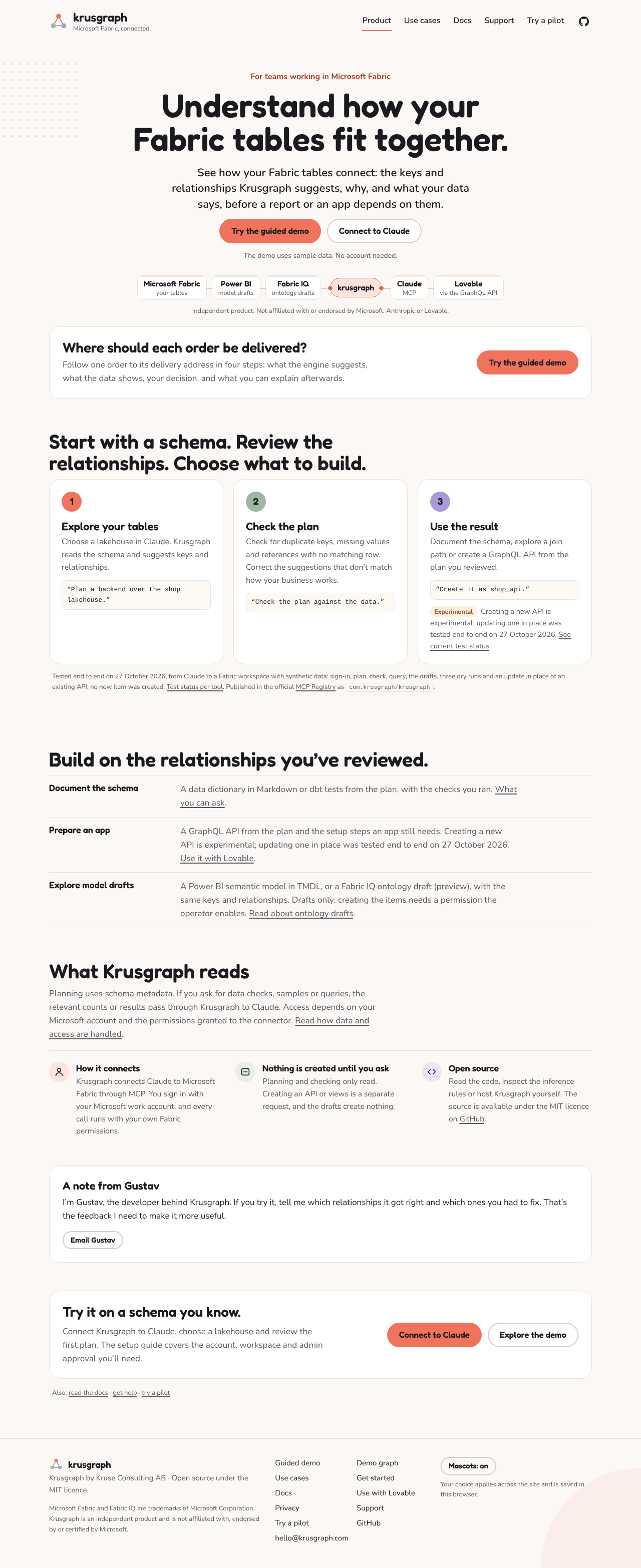
The problem. You have a lakehouse or warehouse in Fabric and you want an app on top of it — in Lovable, or generated by an agent in Cursor or Claude Code. Those tools can read a Fabric API for GraphQL item. They cannot make one. So before the first line of app code you spend an afternoon in the portal: create the GraphQL item, pick tables, define every relationship by hand (no relationships, no nested queries), register a service principal, grant it on the item, turn on introspection, copy the endpoint. Then the schema changes and you do the relationships again.
Microsoft's own GraphQL MCP server queries an API that already exists. Lovable's Fabric connector consumes one. As far as we have found (October 2026), nothing provisions one from inferred relationships; if you know of something that does, open an issue.
What this does. Reads the tables, infers keys and relationships from names (declared constraints win when a warehouse has them), writes the GraphQLApi item definition with ManyToOne / OneToMany relationships, creates the item — or updates it in place when the name exists — and prints the endpoint plus the two portal clicks the API cannot do yet.
%pip install git+https://github.com/Krusmaster/fabric-backend[deploy]
import fabric_backend as fb

out = fb.create(workspace="<workspace id>", source="my_lakehouse", name="shop_api", spark=spark,
                keys={"order_items": ["order_id", "line_no"]})   # optional here: rule K5 infers this one; `keys` overrides
print(out["plan"].summary())
print(out["card"])
7 tables, 6 with keys, 6 relationships
no key (query only; can reference others, cannot be referenced): audit_log
GraphQL endpoint:  https://api.fabric.microsoft.com/v1/workspaces/<ws>/graphqlapis/<id>/graphql
Still to do in the Fabric portal (no API for these yet):
  [ ] shop_api -> Settings -> Introspection -> On   (workspace admin; Lovable needs this)
  [ ] shop_api -> Manage permissions -> add the service principal with 'Run Queries and Mutations'
Paste the endpoint, tenant id, client id and secret into Lovable's Fabric connector. Done.
Same thing from an agent (MCP)
pip install "fabric-backend[mcp]"
FABRIC_ODBC="Driver={ODBC Driver 18 for SQL Server};Server=<sql endpoint>;Database=<lakehouse>;Authentication=ActiveDirectoryInteractive" \
fabric-backend-mcp
The same engine over the one connection in FABRIC_ODBC: list_tables, plan_backend (keys, relationships,
Mermaid — nothing deployed), validate_plan, sample_rows, create_backend, rayfin_connector, ontology_draft,
semantic_model_draft, join_path, data_dictionary, dbt_schema, analyze_schema, suggest_relationships and
create_views (dry run by default). The tools that need Fabric item ids (describe_backend, plan_drift,
app_starter, create_semantic_model, create_data_agent) live in the remote server only. Set FABRIC_SOURCE_KIND
(Lakehouse, Warehouse, SQLDatabase) and FABRIC_SCHEMAS_ENABLED=1 for a lakehouse created with schemas so that
semantic_model_draft writes schemaName; SQLServer for an on-prem or Azure SQL Server, where the two Fabric-only
drafts answer with an explanation. Windows set-up with Claude Desktop, Windows sign-in and what works locally:
docs/LOCAL.md. fabric-backend demo is the 20-minute demo on a laptop: one local page on 127.0.0.1
with the map, the health check with Accept / Skip and five questions run on the customer's own SQL Server or on a folder
of CSV / Excel files; script in docs/DEMO-20-MIN.md. Add the stdio server to Claude Desktop
(docs/LOCAL.md) or another MCP client that starts local stdio servers; only the Claude Desktop set-up
is documented.
The agent can then say "give me a GraphQL API over orders, customers and products" and get an endpoint back.
Remote server (Krusgraph: Claude, VS Code, Cursor and other MCP clients)
The hosted instance is https://krusgraph.com/mcp. Add it in Claude under Customize → Connectors → Add → Add
custom connector and sign in with your Microsoft work account; your Entra admin consents once
(https://krusgraph.com/start has the steps, https://krusgraph.com/docs the details). VS Code, Cursor and other MCP
clients that register themselves use https://krusgraph.com/mcp/connect: Krusgraph shows its own approval page for
the client, then the Microsoft sign-in (https://krusgraph.com/docs#other-mcp-clients; tested on 27 October 2026 with
VS Code, Cursor and Glama; docs/CLIENT-REGISTRATION.md). To run your own:
docker build -t fabric-backend-server . && docker run -p 8000:8000 \
  -e FABRIC_TENANT_ID=... -e FABRIC_CLIENT_ID=... -e FABRIC_CLIENT_SECRET=... fabric-backend-server
Streamable HTTP at /mcp, thirty-nine tools, every one with a title and a readOnlyHint/destructiveHint
(the directory requires it): list_workspaces, list_sources, list_tables, plan_backend (nothing deployed; suggests
composite keys), sample_rows, validate_plan (keys and relationships checked against the rows; by default a summary with every failing check in full, detail="full" for every check), create_backend
(creates or updates one item, never deletes), describe_backend, query_graphql (read-only; mutations refused),
rayfin_connector and ontology_draft; every tool takes the workspace by id or name. Five more read-only tools turn the
same plan into the week's deliverables, all unit-tested and run against the demo workspace (synthetic shop data) on 26 and 27 October 2026:
semantic_model_draft— a Power BI semantic model in TMDL: Direct Lake tables on the SQL analytics endpoint, relationships with one active path per table pair, suggested measures with their reasons (the row count of each fact table, sums only wheresummarizeBysums; never an id, code or year) and, when fact tables have date columns, a calendar marked as the date table; aREADME.generated.mdwith the decisions to check (fabric_backend/semantic_model.pycites the Microsoft sample definitions it follows). The measures and the calendar were added after 26 October and came back from the live run of 27 October (summarizeBy: noneonship_to_id).join_path— the shortest chain of relationships between two tables, rule per hop, ready T-SQL; or which relationship is missing.data_dictionary— hand-over documentation in Markdown with an empty Description column;validate=trueadds counts.dbt_schema— a dbt sources file withunique,not_nullandrelationshipstests (fabric_backend/dbt.pycites the dbt docs).domain_draft— proposed domains (candidate data products) from the plan's graph, the relationships that cross them, unassigned tables and one ODCS v3.2.0 data contract per domain; Fabric domains are created by the customer's admin (docs/DOMAINS.md). Unit tests only.plan_drift— today's plan against an existing API for GraphQL item: what acreate_backendwith that name would change.
Four more tools create things from the same plan, each dry_run=true by default so the first answer is exactly what
would be created, each creating or updating in place under a name and never deleting (create_report only creates); all unit-tested with Fabric
mocked. On 27 October 2026 the first three ran as dry runs against the demo lakehouse; create_semantic_model then created shop_model_live live on 29 October 2026 (reviewed in the Fabric portal the same day; shop_model updated in place from Lovable on 30 October 2026) and create_report created shop_report_live and shop_report live on 30 October 2026 (opened and reviewed in the Fabric portal the same day), while creating with create_views or create_data_agent is unit-tested only (the status per tool: https://krusgraph.com/docs#test-status). The delegated permissions they need, against what the app has today, and
the az commands to add them are in docs/SCOPES.md:
create_semantic_model— a SemanticModel item from the TMDL draft (POST /semanticModels,updateDefinition); needsSemanticModel.ReadWrite.AllorItem.ReadWrite.All(Item.ReadWrite.Allgranted since 28 October 2026).create_views—CREATE OR ALTER VIEWin a schema of its own (krusgraph) on the SQL analytics endpoint or warehouse: a wide view per fact table, one per header table (vw_orders: each order with its customer and, onceorders.ship_to_idis confirmed, its ship-to address; in the dry run of 27 October, not yet created live) and one per hard-to-read relationship; needs no new scope, only the SQL right to create objects.create_data_agent— a Fabric data agent through the public staging API: the plan as instructions, the source as data source, 5–10 example questions with T-SQL, published; needsItem.ReadWrite.All(granted since 28 October 2026).create_report— a Power BI report bound to an existing semantic model, with one page drawn from the model's own measures and columns (PBIR definition, built from the model's TMDL read with getDefinition): a card per count measure, a clustered column chart by the date table's Month, a clustered bar chart by the most-referenced dimension, and a table of the nearest dimension sorted by a measure. A plain SUM of a column the model does not sum, or of a header amount copied onto lines, is never drawn (left_outsays why); when nothing can be drawn the page is left blank.empty_page=truecreates one blank page instead (POST /reportswithcreationPayload.semanticModelReference). A report of that name is left alone, never updated or deleted; needsReport.ReadWrite.AllorItem.ReadWrite.All, andSemanticModel.ReadWrite.Allto read the model. Tried live: the blank-page report was created live on 30 October 2026 (shop_report_live,shop_report), opened and reviewed in the Fabric portal by Gustav the same day; the page with visuals is unit-tested against Microsoft's published PBIR schemas, not yet created in Fabric.app_starter(read-only) — a Lovable prompt, connection details, five GraphQL queries, the portal checklist and the backend an app needs so that no secret reaches the browser: a Supabase edge function that gets the token with the app's service principal and forwards the queries, the secrets as Supabase secrets, the frontend helper, and the per-user alternative (Supabase Auth with Entra, the user's own token forwarded). Drafted live on 27 October; the edge function itself has not been deployed.app_readiness(read-only) — what an app still needs on an existing API: keyless types, unlinked types, write access from the definition, introspection from one probe query, and "unknown" with the click path for what Fabric's API cannot read (permissions, the tenant setting). Unit-tested and run live on 27 October. The whole Lovable chain, step by step with owners and blockers, is in docs/LOVABLE-END-TO-END.md.
From understanding to building (docs/NOTEBOOKS.md; unit-tested, the generated notebooks also ran
on a local PySpark; the drafts and answer_query_draft ran live on 27 October; the silver and gold notebooks that
create_pipeline writes from these drafts ran in Fabric on 7 November 2026, run 9de8bc49, all three steps succeeded;
the notebooks the creating tools below made on 28 October have not been run in Fabric):
silver_notebook_draft/create_silver_notebook— a PySpark notebook for a lakehouse that writes silver tables in a schema of their own: de-duplicated on each key (latest row byorder_bywins), every reference checked with the rows whose reference is missing inkrusgraph_quarantinewith the reason, each step commented with its rule, re-runnable, never over a source table. The create is a notebook item (Notebook.ReadWrite.All, granted since 28 October 2026); it runs nothing.drift_monitor_draft/create_drift_monitor— a notebook and a pipeline that every night compare the plan with the last one, save it inkrusgraph.plans, and send a short summary of what changed and which APIs, models and views it reaches to a webhook set as a pipeline parameter in Fabric; plus the daily schedule. The pipeline needsDataPipeline.ReadWrite.All(granted since 28 October 2026); the schedule needsDataPipeline.Execute.All, which the app does not request, so useschedule=false.answer_query_draft— a question in Swedish or English about some tables as T-SQL over the safest join path (each step with its rule) and, for an existing API, as GraphQL;query_graphqlwithquestionruns the GraphQL version.gold_views_draft/create_gold_views— materialized lake views in Spark SQL over the silver tables: one wide view per fact table in a schema of its own (gold), joined over the safest many-to-one paths, withCONSTRAINT … CHECK … ON MISMATCH DROPrules for the plan's keys and relationships, each commented with its rule; the notebook stops before a source, silver or foreign table (fabric_backend/gold.pycites the syntax and status from Microsoft Learn). The SQL ran on SQLite and a local PySpark 4.0.1 (open-source Spark has no materialized lake views, so the CREATE itself is checked against the documented syntax); in Fabric, insidecreate_pipeline's run of 7 November 2026 (run 9de8bc49).
Existing models, Git and personal data (round n12, unit-tested; on 27 October export_item_definitions ran live as a
draft and compare_semantic_model only as far as the model lookup, the demo workspace having no model):
compare_semantic_model(read-only) — an existing Power BI semantic model against the plan: relationships the model lacks, ones a rule or the data contradicts, other cardinality, both-way filters, active against inactive, links the plan lacks (with aconfirmedentry), columns summed against thesummarizeByrule, suggested measures it lacks. It reads the model's TMDL through Fabric's getDefinition (SemanticModel.ReadWrite.AllorItem.ReadWrite.All; the app hasItem.ReadWrite.Allsince 28 October 2026, and the read-only executeQueries is documented as not supporting the INFO functions), or the TMDL files you pass from a PBIP folder or Git, which needs no permission. Fixture:tests/fixtures/semantic_model_shop.export_item_definitions(read-only) — what the creating tools would create, as folders in Fabric's Git format (<name>.<type>with.platformand the definition files) for your own repository, so that Fabric's Git integration or a deployment pipeline makes the change; calls no Git provider.- Personal data (
fabric_backend/privacy.py) — columns flagged by name, one rule per pattern (name, e-mail, phone, national id, address, birth date), masked insample_rows, left out of drafted queries and gold views, masked in the silver quarantine;show_personal_data=trueshows them. The source item's sensitivity label id is named when Fabric returns one.
Beside Microsoft's own Fabric MCP servers (the Fabric MCP Server and Fabric Core for workspaces, items and files; Fabric IQ MCP for questions to semantic models; the Power BI Modeling MCP server for editing a model), Krusgraph is the part that works out how the tables relate and builds from that plan: https://krusgraph.com/docs#with-microsoft-s-fabric-mcp-servers. Krusgraph is not affiliated with Microsoft.
Two read-only tools look at the plan as a graph (fabric_backend/graphs.py, pure Python, deterministic; unit-tested and
run against the demo workspace (synthetic shop data) on 26 and 27 October 2026):
analyze_schema— table roles (fact, dimension, bridge, isolated) with the numbers behind them, the ten most central tables (degree, betweenness, PageRank), subject areas, cycles and table pairs with more than one path, and which relationships can be active at once in a semantic model (maximum spanning forest by certainty).suggest_relationships— columns that could point at another table's key but are in no relationship, ranked by name, type and triangular closure, the best fifteen checked against the data (inclusion share, distinct values); suggests only.lineage— which objects in the workspace build on the source's tables: GraphQL APIs (their definition), semantic models (their TMDL), views on the SQL endpoint (INFORMATION_SCHEMA.VIEW_TABLE_USAGE), data agents (named in their definition, marked as not certain); the objects per table, the tables used by nothing, and withtablewhat a change reaches.plan_driftnames the same objects for the tables and columns a re-run would drop (impact). Unit-tested with Fabric mocked and run live on 27 October (where it skippedshop_api, fixed since and unit-tested). A plan covers one schema of one source item; tables a lakehouse holds as shortcuts are part of it. A graph over several sources is a design note only: docs/MULTI-SOURCE.md.
How the graph is weighted
| Origin of a relationship | Certainty | Used for |
|---|---|---|
Declared foreign key (R0) or confirmed | 1.0 | |
Any rule, when validate_plan found no orphans | 0.9 | safest join_path, active relationships in semantic_model_draft |
| R1 (column named after the table) | 0.8 | |
| R2 (column with the target key's name) | 0.6 | |
| R3 (composite key present), R4 (role prefix or abbreviation) | 0.5 | |
| R5 (code or role column, values counted in the rows): no own weight, the default | 0.5 | 0.9 once validate_plan finds no orphans |
Cost is 1/certainty; the shortest path counts hops, the safest path minimises cost, and when they differ join_path
says why. Roles come from in/out degree, betweenness and the share of measure-like columns; subject areas from label
propagation with a fixed order; ambiguity from the relationships a spanning forest leaves out (each closes a cycle). The tool table with arguments
and an example question per tool is on https://krusgraph.com/docs. Authentication: a Authorization: Bearer Fabric
token on the request wins; otherwise the server's own service principal — the same model as
Lovable's Fabric connector. The server keeps nothing between requests (no database, no files). Put TLS in front, add it to Claude as a
custom connector with the https://…/mcp URL, and the loop is browse → plan → create → query.
The local stdio server (fabric-backend-mcp, ODBC string) stays for single-user use.
Sign-in with Microsoft (how krusgraph.com runs). Set MCP_PUBLIC_URL, ENTRA_CLIENT_ID and
ENTRA_CLIENT_SECRET and the server switches to per-user Entra sign-in: unauthenticated calls get the 401 with
a resource_metadata pointer that Claude needs, /.well-known/oauth-protected-resource describes the resource,
each user's token is validated (issuer per tenant, audience = the app, signature) and exchanged on-behalf-of for
Fabric and SQL tokens — every call runs with that user's own Fabric permissions. The delegated permissions the
Entra app asks for (7 November 2026): User.Read; Fabric Workspace.Read.All, Item.Read.All, GraphQLApi.ReadWrite.All,
GraphQLApi.Execute.All, Notebook.ReadWrite.All, DataPipeline.ReadWrite.All, Item.ReadWrite.All (the last three
since 28 October 2026); Azure SQL user_impersonation. Not requested: DataPipeline.Execute.All or Item.Execute.All,
so nothing is run or scheduled. What each tool uses them for: docs/SCOPES.md. Metadata, the counts from the checks, requested sample rows
and query results pass through the server in memory only and are not kept; Claude's tokens stay in memory, and the only
stored records are the encrypted sign-in records of other MCP clients described below. Each tool call leaves an anonymous
usage record, and /privacy says which technical logs the deployment keeps. MCP clients other than Claude (VS Code, Cursor, Glama)
register themselves as OAuth clients, which Entra cannot do; KRUSGRAPH_CLIENT_REGISTRATION=1 serves them at
/mcp/connect through Krusgraph's own authorization server at /oauth in front of Entra: Client ID Metadata Documents,
optional strict dynamic registration, a consent page of Krusgraph's own per client, PKCE S256, and the same token
validation as /mcp, with a few short-lived sign-in records in Azure Table Storage; Claude's sign-in at /mcp is
unchanged either way (docs/CLIENT-REGISTRATION.md; off by default, unit-tested, not yet
tried with a real client). The same process serves the website (/, /explore, /start,
/support, /partners, /docs, /privacy; static files under fabric_backend/static/, no external resources).
Operations (docs/OPERATIONS.md; unit-tested, not deployed): fair-use limits per user and per
organisation (kind: rate_limited with retry_after; KRUSGRAPH_RATE_*), one anonymous usage line per tool call and a
token-protected /metrics (off by default), /health for uptime checks, the client secret optionally from Azure Key Vault
(ENTRA_CLIENT_SECRET_KEYVAULT_URI, set up by deploy/krusgraph.sh --key-vault), and a dormant paid-plan check
(KRUSGRAPH_ENTITLEMENTS, off; docs/PRICING-NOTES.md). For the person on duty,
deploy/krusgraph.sh --doctor (one table of the service's state, reads only), --budget (a cost budget with e-mail)
and --backup (the registration table's consent records to a file), with a continuity checklist, are sections 8
and 9 of the same file.
PRODUCT_NAME, CONTACT_EMAIL and the optional COMPANY_ORGNR fill the pages; KRUSGRAPH_BUILD (set by the deploy script to the image's source tag) is echoed on /healthz so a deploy can tell the new revision from the old one; KRUSGRAPH_DEBUG_ERRORS=1 adds the exception class to tool error answers, for an operator debugging a case; KRUSGRAPH_ONTOLOGY_WRITE (deploy config ontology_write) is no longer read: create_ontology is always offered, dry run by default; PARTNER_SIGNIN=1 shows a
not-yet-wired partner sign-in button. deploy/ has the Azure Container Apps deployment (krusgraph.sh,
--check, --update, --status, --key-vault; exact image versions in deploy/constraints.txt; see deploy/KRUSGRAPH-START.md), the synthetic demo dataset
(fabric_backend.seed) and the directory submission draft (deploy/SUBMISSION.md). Tool failures come back
as {"error", "kind", "hint"} (fabric_backend/errors.py): an unknown workspace, a missing or paused
capacity, an expired sign-in or missing consent, a missing schema or table, a timeout, each in plain words and
never with a token, a header or a traceback.
How the relationships are inferred
A lakehouse SQL endpoint has no keys and no foreign keys, so names are all there is. Every result carries the rule that produced it, and you can overrule any of them.
| Rule | Keys | Rule | Relationships | |
|---|---|---|---|---|
| K0 | declared primary key | R0 | declared foreign key | |
| K1 | keys={"order_items": ["order_id", "line_no"]} | R1 | column <table>_id / <singular>_id → that table's single key | |
| K2 | id, <table>_id, <singular>_id, <table>_key, <table>_code, or an abbreviation of four letters or more (cust_key) | R2 | same name as another table's single key (werks → plant); plain id never matches | |
| K3 | none → query only, nothing can point at it | R3 | all columns of another table's composite key are present | |
| K4 | junction: the table starts with two or more reference columns (film_actor: actor_id + film_id) | R4 | weaker match when R1/R2 find nothing: a role before the name (manager_staff_id → staff) or an abbreviation (o_custkey → customer) | |
| K5 | line: the header reference plus a line-number column (order_items: order_id + line_no) | R5 | only with rows (plan(..., execute=...); plan_backend and /check do not pass them yet): a code column <stem>_code/_no/_key (currency_code → currencies.code, ERP_Customer_No__c → customers.customer_no) or a role name (ship_to_id → addresses, created_by → users), planned when every value is in the target's key, same type family, two or more distinct values and one table fits; otherwise plan.proposed with the reason |
Names are compared without case, separators or a table-wide column prefix (N_NATIONKEY in NATION reads as
nationkey), and <X>Header also answers to <X>. How well this works on Northwind, Chinook, TPC-H,
AdventureWorks and Sakila, from names alone, is measured in docs/INFERENCE.md.
A column that could point at two tables (user_id with both users and user present) is
reported under plan.ambiguous and not applied. A column no name rule matches (ship_to_id in the demo schema) is
left unlinked by names alone; with the rows (R5) it is linked when its values say so, and confirmed=[...] adds it
otherwise. Two columns pointing at the same table get fields
named by column (airport_by_origin_airport_id). Anything the rules miss goes in confirmed=[...]
and is applied first. An entry can name the two GraphQL fields too: field_name on the source and reverse_name on
the target ({"source": "orders", "source_cols": ["ship_to_id"], "target": "addresses", "target_cols": ["address_id"], "field_name": "address", "reverse_name": "orders"} gives orders.address and addresses.orders); without them the
rules name the fields. Updating an existing API, create_backend keeps the names it already has for the same
relationship (the same columns in the same direction) unless the entry names them otherwise.
Dry run without deploying:
p = fb.plan_from(spark=spark)          # or execute=<callable running SQL against the endpoint>
print(p.summary()); print(p.mermaid())
Offline, from an INFORMATION_SCHEMA.COLUMNS export:
fabric-backend plan columns.csv --keys keys.csv --mermaid er.mmd
fabric-backend definition columns.csv --name shop_api --workspace <ws> --source-item <sql endpoint id> --out def.json
fabric-backend deploy def.json --workspace <ws>
The consultant outputs from the same CSV, nothing created: semantic-model (TMDL folder, --sql-endpoint,
--source-name, --source-kind, --schemas-enabled), join-path START END (the chain with its T-SQL, exit 1 and a
suggestion when there is none), dictionary (Markdown), dbt (sources yml, --legacy-arguments for dbt before
1.10.5), analyze (roles, central tables, areas, ambiguity; --json for the full graph) and views (the
CREATE OR ALTER VIEW statements to run yourself, GO between the batches). fabric-backend --help lists them.
When a literal name finds nothing, a small documented synonym table is tried (abbreviations such as cust, prod, ord,
emp; Swedish and German business words; dim_/fact_/tbl_ prefixes; _sk/_bk suffixes), after transliteration of
å ä ö ü ß. Such a match counts as R4, carries a note on the relationship and is listed under plan.synonyms. The
benchmark in docs/INFERENCE.md shows before and after on eleven schemas.
Same plan, second output: Rayfin (Fabric Apps) connector entities
Rayfin is Microsoft's open-source
backend SDK for apps on Fabric (Build 2026; Replit is the launch partner). It reaches existing
tables through connectors: npx rayfin connector add discovers the schema, and then
every entity class is written by hand —
decorator per column, key per table, and no syntax for relationships between connector entities
in the docs. This writes them from the same plan:
files = fb.rayfin_files(out["plan"], connector="shop")        # also in out["rayfin"] after fb.create
fb.write_rayfin(files, root="path/to/your/rayfin-app")        # rayfin/connectors/shop/*.ts + schema.ts
// rayfin/connectors/shop/Orders.ts — generated
@role('authenticated', ['read'])
@entity()
// key order_id by rule K2  (by name — remove primaryKey if that is wrong)
export class Orders extends Source({ schema: 'dbo', table: 'orders', primaryKey: ['orderId'] }) {
  @int({ column: 'order_id' }) orderId!: number;
  @int({ column: 'customer_id' }) customerId!: number;
  @date({ column: 'order_date' }) orderDate!: string;

  @one(() => Customers, { sourceFields: ['customerId'], targetFields: ['customerId'] }) customer?: Customers;   // [R1]
  @many(() => OrderItems, { sourceFields: ['orderId'], targetFields: ['orderId'] }) orderItems?: OrderItems[];  // [R1]
}
Offline: fabric-backend rayfin columns.csv --keys keys.csv --connector shop --out ., or straight
from the metadata.json that npx rayfin connector add writes (fabric-backend rayfin rayfin/connectors/shop/metadata.json --schema shop ...) — it has columns and types but no keys,
so inference still runs. The full output for the synthetic schema is in examples/rayfin/. From
an agent: the MCP tool rayfin_connector.
The generated connector is read-only by default: schema.ts and src/lib/connectors.ts set
operations: ['read'], and the README's npx rayfin connector add step passes --operations read. Rayfin 1.36.2
allows every CRUD verb (read, create, update, delete) when operations is left out, so the files always name
it; rayfin_files(..., operations=["read", "create"]) widens it where an app must write. Relationships confirmed by
the caller or counted in the rows (rule R5, such as orders.ship_to_id → addresses.address_id in the synthetic
shop) are generated as @one / @many like the name rules' ones.
Two things the Rayfin docs do not say, learned from running it: @one/@many work on connector
entities only with sourceFields/targetFields — without them Rayfin invents a column
(customer_customer_id) and the query fails; and @date() properties are typed Date, not
string. Both are generated. The docs do say don't infer a primary key from a column name; this
does, and prints the rule beside every key so you can take it out.
Besides the connector's entities, the output has the app side, written at the project's root (in a blankapp project,
where packages/frontend/package.json exists, src/ goes under packages/frontend/):
src/lib/connectors.tswires the connector into the app (AppConnectorsSchema,connectorConfigs,connectorRuntimesandgetConnectorsClient(), aConnectorsRayfinClientfrom@microsoft/rayfin-client). It imports the connector'sschema.tswithimport typeonly and lists each entity's columns by name, checked against the entity types; that is the form@microsoft/rayfin-connectorsrecommends for code the browser loads, because a decorated entity class cannot be bundled.src/pages/<Table>Page.tsxlists the latest rows of one table through the connector (--page-table, by default a fact table): an explicit column list, newest first by the first date column, else by the key.rayfin/tsconfig.json, the one in thedata-apptemplate of@microsoft/rayfin-cli1.36.2, written only where the project has none.
Columns that look like personal data by name are left out of the page and of the default columns; the entity classes still describe them.
Publishing in Fabric
Use the blankapp template. On 6 November 2026 both templates were created with the 1.36.2 npm packages (no login, no
rayfin up) and the files generated for the shop example dropped in:
| Template | Hand changes before tsc and npm run build pass |
|---|---|
blankapp (after npm run pack:add -- connectors) | none; the app files go under packages/frontend/src/, which --out . does |
dataapp (built for semantic models) | three in the template's files: keep the SemanticModelConnectors type in src/lib/connectors.ts, give new ConnectorsRayfinClient in src/lib/rayfin-client.ts its type arguments, cast through unknown in src/hooks/use-semantic-model-query.ts; the template's src/lib/connectors.spec.ts then fails two tests that expect the CLI's marker |
The steps below are those of the run of 5 November 2026 (Rayfin 1.36.2, synthetic lakehouse, dataapp), with that
run's hand steps replaced by the generated files and the template changed to blankapp; the generated
README.generated.md repeats them with your connector's name.
First, a Fabric admin turns on the tenant setting "Enable Fabric App Items (preview)" (AppBackendTenant) in the
Admin portal. Until it was on, npx rayfin up failed with 403 "The feature is not available". An admin can read the
setting with GET /v1/admin/tenantsettings. Leave anonymous data access off.
npm create @microsoft/rayfin@latest -- <app> --template blankapp --workspace "<workspace>"(in Windows PowerShellnpm.cmd create ...), thencd <app>.npm run pack:add -- connectors(the template's step for existing Fabric sources).npx rayfin loginnpx rayfin connector add --type fabric-sqlanalytics --workspace-id <ws> --item-id <item> --name shop --operations read, then run thenpm installit prints, inside the project. It may say it wired nothing: it wires a connector only onceschema.tsexportsconnectorConfig, and at this pointschema.tsis still a placeholder.fabric-backend rayfin rayfin/connectors/shop/metadata.json --schema shop --connector shop --out .- Review the keys: delete
primaryKeywhere a K2 key (inferred from a column name) is wrong. - Use the generated files: in
packages/frontend/src/App.tsx, render the generated page (<OrderItemsPage />for the shop example) in place of the template's placeholder. npx tsc -p rayfin/tsconfig.json --noEmit,npm run typecheckandnpm run buildnpx rayfin up --workspace <workspace>; when asked, choose that visitors must sign in.- If the connector step failed:
npx rayfin up connector apply --name shop. A failed connector apply ("No usable compiled connector entities") does not make the deploy report failure, so read the warnings.
What was verified: in the run of 5 November a published app showed rows from a table through the connector, with
src/lib/connectors.ts and the page written by hand (connector add had printed "Wired 0", and importing the entity
classes with their decorators had stopped the build, so the page imported the schema as a type only and passed
explicit column lists). The generated files do the same things. tests/test_rayfin_app.py compiles them, the page
included, with tsc against @microsoft/rayfin-* 1.36.2 and TypeScript 5.7.3 (pinned in
tests/fixtures/rayfin_check/), in a project laid out like the dataapp template and in one laid out like the blankapp template after
pack:add -- connectors. What was not: the generated files have not been deployed to Fabric or opened in a browser,
and no app has been published from a blankapp project; sign-in, the connector apply and reading rows happen only
there.
Sources it can expose
| Source | sourceType | Writes | Rayfin connector |
|---|---|---|---|
| Lakehouse | SqlAnalyticsEndpoint (the endpoint's id, resolved for you) | no | fabric-sqlanalytics |
| Mirrored database (Snowflake, Azure SQL, Cosmos DB, SAP via Datasphere, ...) | SqlAnalyticsEndpoint | no | fabric-sqlanalytics |
| Mirrored Azure Databricks catalog | SqlAnalyticsEndpoint (via the item's SQL analytics endpoint) | no | fabric-sqlanalytics |
| Snowflake database (Fabric item) | SqlAnalyticsEndpoint (via the item's SQL analytics endpoint) | no | fabric-sqlanalytics |
| Mirrored catalog (preview) | SqlAnalyticsEndpoint (via the item's SQL analytics endpoint) | no | fabric-sqlanalytics |
| Warehouse | Warehouse | writable=True → Create/Update (Delete stays off) | fabric-warehouse |
| Fabric SQL database | SqlDbNative | writable=True | fabric-sqldatabase |
Fabric IQ. ontology_draft (remote server), fabric-backend ontology (CLI) and fabric_backend.ontology_files
write the plan as a Fabric IQ ontology (preview): entity types with a key and properties, relationship types, data
bindings, in the item's generation-2 definition (TMDL parts for POST /workspaces/{id}/ontologies or Git) plus a
Turtle file for the portal's Import ontology and a binding checklist. Creating the item needs Item.ReadWrite.All;
create_ontology creates or updates the item from the same plan (dry run by default; without the permission it answers
consent naming the scope). Checked against recorded definitions and the specification's examples, not live yet.
Documentation truncated — see the full README on GitHub.
Reviews
No reviews yet
Be the first to review this server!
More Developer Tools MCP Servers
Rea
Freeby Morluto · Developer Tools
Reverse engineer anything from your terminal or agent with one CLI and MCP server.
Paperclip
Freeby Paperclipai · Developer Tools
Trending hip-hop artist momentum scores across four cultural dimensions.
Fetch
Freeby Modelcontextprotocol · Developer Tools
Web content fetching and conversion for efficient LLM usage
Git
Freeby Modelcontextprotocol · Developer Tools
Read, search, and manipulate Git repositories programmatically
Toleno
Freeby Toleno · Developer Tools
Toleno Network MCP Server — Manage your Toleno mining account with Claude AI using natural language.
MCP Marketplace
Freeby mcp-marketplace · Developer Tools
Search and install MCP servers from inside your AI client.