
Server data from the Official MCP Registry
Persistent context for Claude. Your AI always knows your projects and next actions across sessions.
About
Persistent context for Claude. Your AI always knows your projects and next actions across sessions.
Remote endpoints: streamable-http: https://mcp.threadminder.ai/mcp
Security Report
Valid MCP server (1 strong, 0 medium validity signals). No known CVEs in dependencies. Imported from the Official MCP Registry.
Endpoint verified · Requires authentication · 1 issue found
Security scores are indicators to help you make informed decisions, not guarantees. Always review permissions before connecting any MCP server.
Permissions Found in Source Code
Found by scanning the linked source code. This listing connects to a hosted endpoint, so none of this runs on your machine: it describes what the server software does where it is hosted.
How to Connect
Remote Plugin
No local installation needed. Your AI client connects to the remote endpoint directly.
Add this to your MCP configuration to connect:
{
  "mcpServers": {
    "ai-threadminder-threadminder": {
      "url": "https://mcp.threadminder.ai/mcp"
    }
  }
}Documentation
View on GitHubFrom the project's GitHub README.
Threadminder MCP
So your AI always knows what's going on.
Threadminder is a persistent context layer for Claude. Connect it once and Claude always knows where your projects stand, what's in progress, and what's next — across every chat, every session, every day.
No re-explaining. No digging through 47 old chats. Just open Claude and keep going.
"It changed my life within a day." — Amy, founder @ PluralityWorks
What it does
Once connected, Claude can:
- Remember your projects across sessions automatically
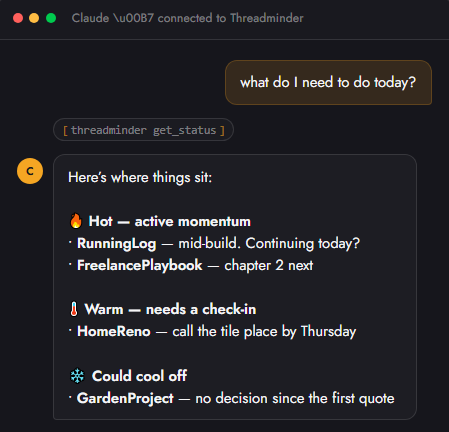
- Give you a full status update across everything at once — no drilling into each project one by one
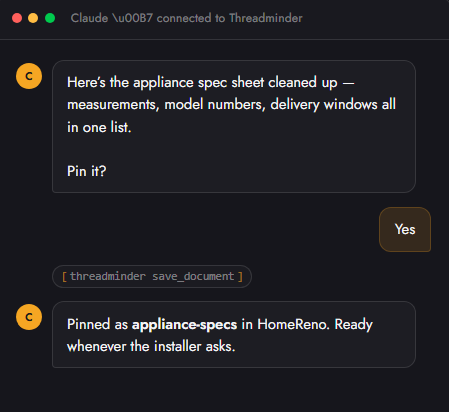
- Save decisions mid-conversation — just say "pin that"
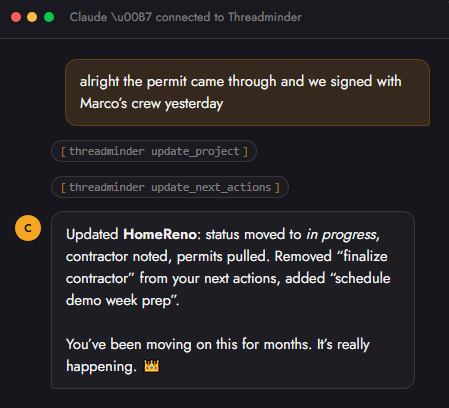
- Update project status as you work, without you filling out a single form
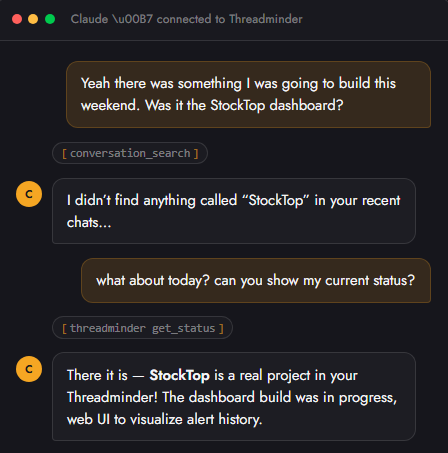
- Surface things you forgot — "wasn't there something I was going to do this week?"
It lives inside your Claude conversations. Not another app. Not another tab. Just Claude, but it finally remembers.
Screenshots
Getting your full project status at a glance:
Updating next actions mid-conversation:
Saving a document with a single command:
Handling a failed search gracefully:
Getting Started
- Sign up at threadminder.ai — free trial, no card required
- Get your personal MCP URL from the dashboard
- In Claude, go to Settings → Integrations → Add connector
- Paste your URL and authenticate
- Open any existing Claude chat and say: "Can you take what you know about this and make a project/status?"
That's it. Claude will build your first project from the conversation context and keep it updated automatically from that point on.
Compatibility
| Platform | Status |
|---|---|
| Claude (claude.ai) | ✅ Supported |
| ChatGPT | 🔜 Coming soon |
Pricing
| Plan | Price | Projects | Platforms |
|---|---|---|---|
| Personal | $6/mo | 5 | 1 |
| Pro | $15/mo | Unlimited | All |
Free trial available. No credit card required.
Links
Built by PluralityWorks
Reviews
No reviews yet
Be the first to review this server!
More Developer Tools MCP Servers
Rea
Freeby Morluto · Developer Tools
Reverse engineer anything from your terminal or agent with one CLI and MCP server.
Paperclip
Freeby Paperclipai · Developer Tools
Trending hip-hop artist momentum scores across four cultural dimensions.
Toleno
Freeby Toleno · Developer Tools
Toleno Network MCP Server — Manage your Toleno mining account with Claude AI using natural language.
MCP Marketplace
Freeby mcp-marketplace · Developer Tools
Search and install MCP servers from inside your AI client.
mcp-creator-python
Freeby mcp-marketplace · Developer Tools
Create, build, and publish Python MCP servers to PyPI — conversationally.
by Lharries · Communication
Read, search, and send WhatsApp messages through your AI assistant